Vimeo Video Downloader
Paste a Vimeo link — watch the full, uncropped video and download the original file.
Vimeo Video Downloader — questions
How do I use the Vimeo Video Downloader?
Copy the Vimeo link from the Share menu, paste it into VidNexo and tap Download. The preview shows the full frame before you save.
Is the VidNexo Vimeo Video Downloader free?
Yes. It is completely free, with no sign-up for public posts.
Does VidNexo remove the Vimeo watermark?
VidNexo saves the original file exactly as published, in the highest available quality.
Does the Vimeo Video Downloader work on phones?
Yes. It works in any browser on Android, iPhone, Windows and Mac, and there is a free VidNexo Android app.
Copy a link, save the post
Choose a platform to see where its Share and Copy link buttons lead.
Step by step
How to download from Vimeo

Vimeo
1Tap Share in Vimeo
Open the public video or post in the Vimeo app and tap the Share arrow.
- SendCopy linkMore
2Tap Copy link
A menu slides up from the bottom. Tap Copy link — the link is now copied.
- VidNexo downloaderVidNexo — No watermarkdl.vidnexo-downloader.shop
3Open VidNexo in Chrome
Open dl.vidnexo-downloader.shop in your browser.
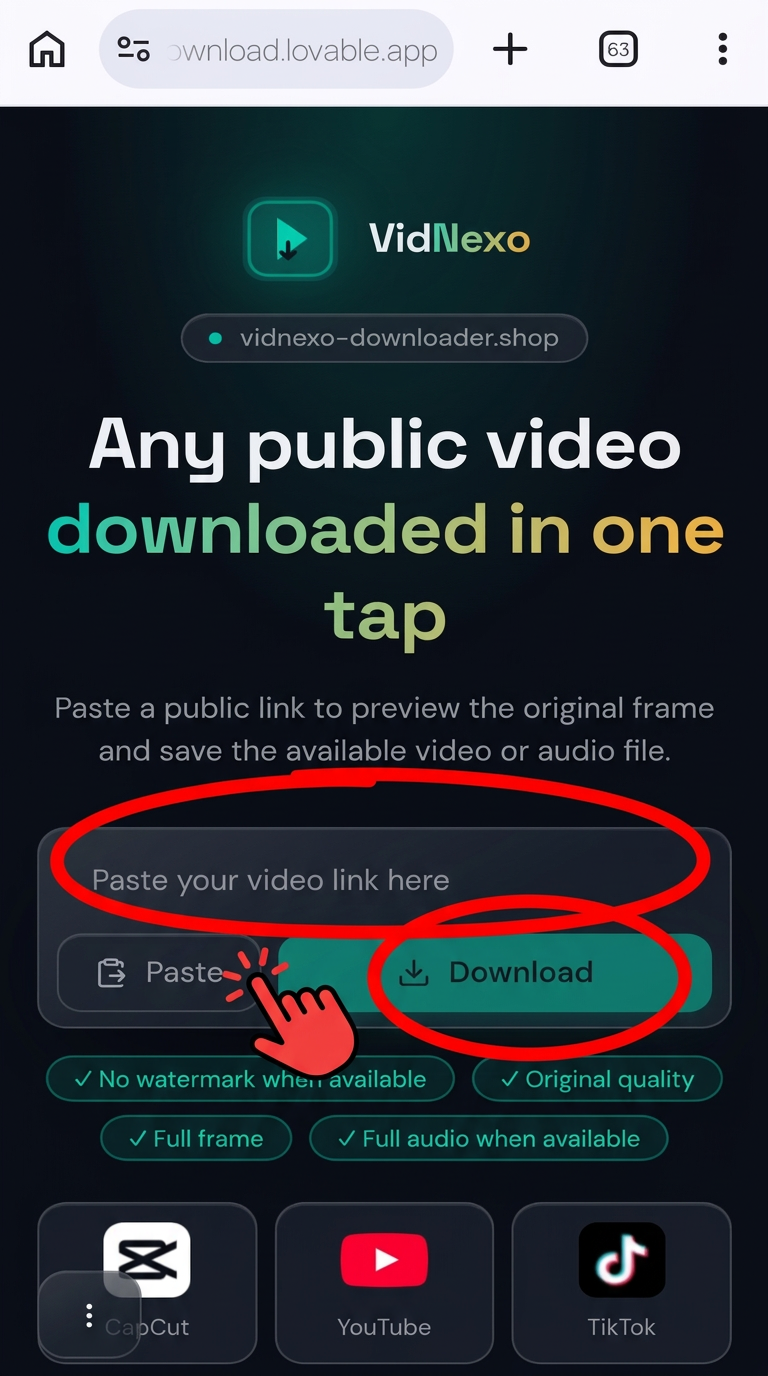
4Paste the link & tap Download
Tap Paste (or long-press the box), then tap Download.
- Download
5Watch & save
The video appears right below the box. Tap the download button to save it.
Menus may look slightly different on your phone.
How it works
- 01
Copy the link
Tap Share → Copy link in YouTube, TikTok, Instagram or any app.
- 02
Paste it here
Paste into the box above — we fetch it automatically.
- 03
Watch & download
Preview the full frame, then save video, music or photos.
Why VidNexo
No watermark
CapCut and TikTok videos without the logo overlay.
Available quality
Save the file supplied by the source, without cropping the frame.
Music playback
Listen and save when the source supplies a separate audio file.
Never cropped
Portrait and landscape videos fit the player completely.
Smart link detection
Paste the whole share text — we find the link.
Developer API
Connect your own app with an API key for instant results.
FAQ
Is it free?
Yes. VidNexo is free to use for public posts.
Can I download private videos?
No. Only public posts are supported — private or age-restricted media can't be fetched.
Where are files saved?
In your device's Downloads folder, like any other download.
Does it work on phones?
Yes — Android, iPhone and desktop browsers are all supported.
Is there a VidNexo Android app?
Yes. Tap Install, then Install APK, to download the free VidNexo Android app and install it on your phone.
Does VidNexo crop videos?
No. Portrait and landscape videos are shown and saved in their full original frame.

VidNexo Android
APK · Free
Previous releases
VidNexo 1.4
APK · 31.54 MB
VidNexo 1.3
APK · 31.88 MB
VidNexo 1.2
APK · 30.69 MB
VidNexo 1.1
APK · 30.69 MB
Installation
- 1Tap “Install APK”The VidNexo.apk file downloads to your phone.
- 2Open the downloaded fileTap the download notification or open it from the Downloads folder.
- 3Allow installationIf asked, turn on “Allow from this source” for Chrome, then go back.
- 4Tap Install, then OpenVidNexo appears on your home screen, ready to use.